
StarVista
An immersive platform designed to make stargazing more accessible, social, and inspiring.
Role: UX/UI Designer
Timeline: ~100 Hours
Responsibilities: UX Research · Product Strategy · User Flow · Wireframing · Visual Design · Prototyping · Usability Testing
Tools: Figma · Miro · Canva
Why StarVista?
StarVista is a self-initiated mobile experience designed for people who love exploring the night sky. The project began with a simple question: why does stargazing still require users to switch between multiple disconnected apps?
I designed StarVista as an all-in-one platform that combines weather insights, celestial exploration, immersive viewing, and community interaction into a more intuitive and emotionally engaging experience.
Why This Project Exists
My interest in stargazing began during an Astronomy 101 course in college, where I experienced my first real night-sky observation at a beach away from city lights. Seeing the stars clearly with the naked eye completely changed how I viewed astronomy, and since then, stargazing has become one of my favorite outdoor experiences.
Over time, I noticed that people approached stargazing very differently. Some enjoyed astrophotography, some were interested in astronomy knowledge and celestial events, while others simply loved the atmosphere and emotional experience of being under the night sky.
As I explored more, I realized the overall experience felt fragmented. Weather forecasts, cloud coverage, AR constellation tools, astronomy news, event discovery, and community interaction were all separated across different platforms. Existing tools were often either too technical for beginners or too limited for experienced users.
StarVista was designed to explore how a single platform could make stargazing more accessible, immersive, and socially connected for different types of users.
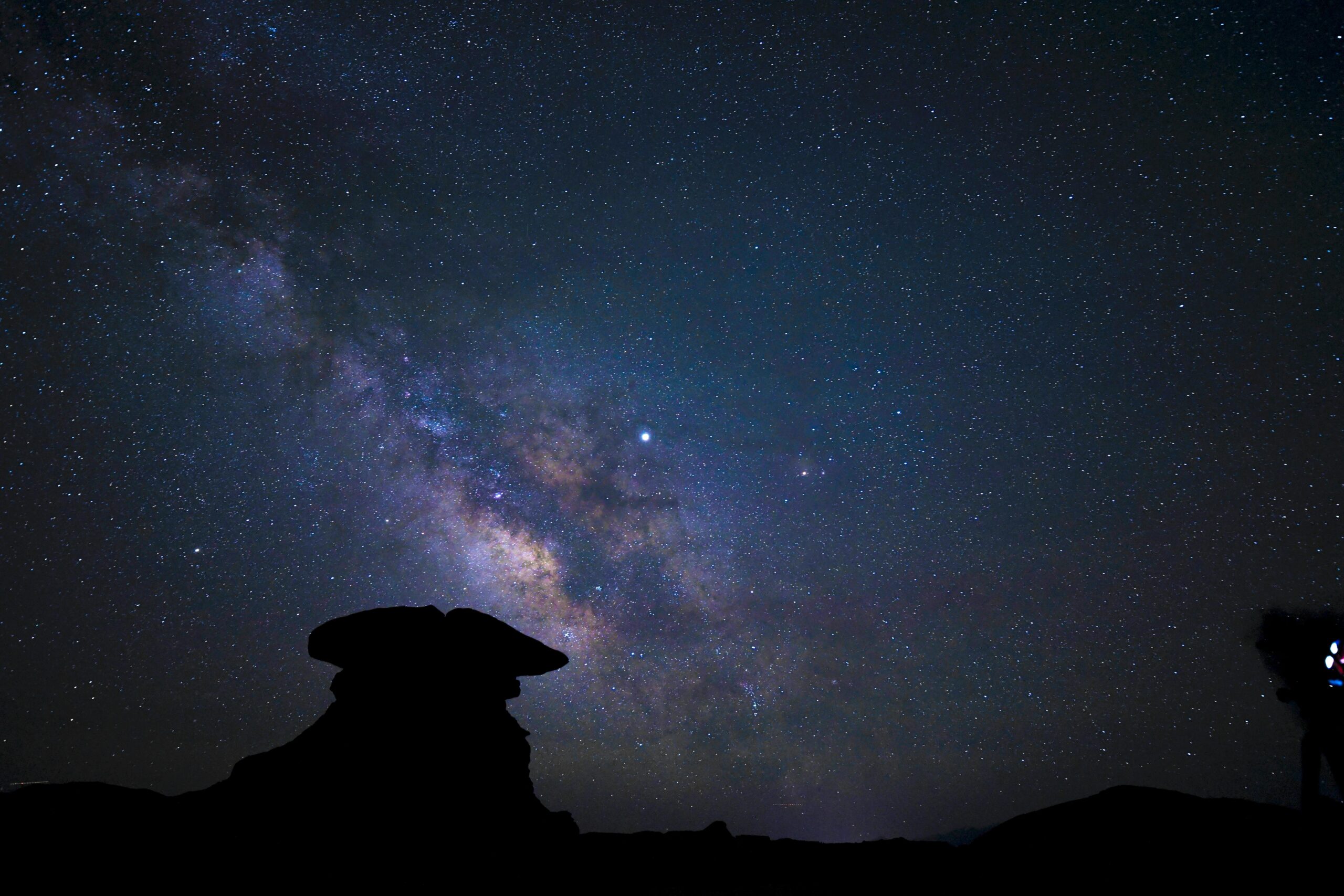
The Problem
Although stargazing can feel immersive and memorable, the process of planning and exploring often requires users to switch between multiple disconnected tools. Weather conditions, light pollution, AR star maps, astronomy news, locations, and community updates are usually spread across separate platforms, making the experience harder to prepare for and less accessible for different types of users.
Fragmented Tools
Users rely on separate apps for weather, AR stargazing, astronomy news, locations, and community updates.
Beginner Accessibility
Many astronomy apps feel too technical for beginners who simply want to explore and enjoy the night sky.
Planning Uncertainty
Important information such as cloud coverage, visibility, timing, and location conditions is difficult to gather in one place
Missing Emotional Layer
Most tools focus on data or functionality, but overlook the immersive, social, and emotional side of stargazing.
Research Overview
To better understand the stargazing experience, I conducted user interviews, analyzed existing astronomy platforms, and explored how different types of users planned and experienced stargazing activities.
The goal was to identify both functional pain points and the emotional motivations behind why people engage with astronomy-related experiences.
User Interviews
I conducted user interviews to better understand how people planned, experienced, and engaged with stargazing activities.
The goal was to uncover both practical frustrations and emotional motivations across users with different levels of astronomy knowledge and outdoor experience.
Different Motivations
Users often relied on multiple apps for weather forecasts, cloud coverage, star maps, astronomy news, and event coordination.
Accessibility Challenges
Some users were deeply interested in astronomy and celestial events, while others simply enjoyed the calm atmosphere and emotional experience of being outdoors at night.
Fragmented Planning
Many beginners found existing astronomy apps too technical or overwhelming to navigate comfortably.
Social Experiences Matter
Users valued community interaction, live updates, and shared experiences during events such as meteor showers and aurora sightings.
Ecosystem Analysis
Existing stargazing experiences often require users to switch between multiple disconnected platforms throughout a single journey.
I analyzed the current ecosystem to better understand how users planned stargazing activities, explored celestial information, and interacted with astronomy communities.
Planning & Weather
Used For
Identifying stars, constellations, and celestial objects through AR or star maps.
Existing Platforms
Weather apps, Clear Outside, AccuWeather
Pain Points
Lack of astronomy-specific context and limited integration with exploration tools.
Sky Exploration
Used For
Checking cloud coverage, visibility, and weather conditions before stargazing trips.
Existing Platforms
Sky Guide, SkyView, Star Walk
Pain Points
Strong exploration tools, but limited planning and community interaction.
Community & Events
Used For
Finding stargazing locations, live updates, and astronomy-related discussions.
Existing Platforms
Reddit, Discord, Facebook Groups
Pain Points
Information is scattered and difficult to organize or revisit.
Astronomy Discovery
Used For
Learning about meteor showers, auroras, and celestial events.
Existing Platforms
NASA news, astronomy websites, social media
Pain Points
Event discovery feels disconnected from actual planning workflows.
Synthesizing Research
After conducting interviews and analyzing existing platforms, I organized recurring observations and behavioral patterns to better understand how people approached stargazing experiences.
Emotional vs. Technical Motivations
Some participants approached stargazing as a relaxing and emotional outdoor activity, while others were more focused on technical astronomy knowledge, equipment, and photography preparation.
Planning Behaviors
Participants consistently checked weather conditions, visibility, cloud coverage, and location information before deciding whether to travel for stargazing activities.
Multi-Platform Workflows
Users frequently relied on separate platforms for astronomy exploration, weather forecasting, event discovery, and social coordination.
Shared Experiences
Community interaction, live discussions, and group coordination played an important role during astronomy-related events and outdoor experiences.
Key Findings
Emotional & Social Motivations
Many participants described stargazing as more than a scientific activity.
For some, it was about calmness, atmosphere, and emotional connection, while others valued the shared experience of discovering celestial events with friends or online communities.
Fragmented User Journeys
Participants consistently relied on multiple disconnected platforms throughout a single stargazing experience — switching between weather apps, astronomy tools, social platforms, and event resources.
Accessibility vs. Depth
Beginners preferred simple guidance and approachable experiences, while experienced users expected deeper astronomy information, detailed planning tools, and advanced exploration features.
Community Strengthens Engagement
Live discussions, group coordination, and shared discoveries significantly shaped how users experienced astronomy-related events and outdoor activities.
Design Opportunity
These findings revealed an opportunity to design a unified platform that supports planning, exploration, learning, and community interaction within one immersive experience.
Defining the Product Direction
After synthesizing the research findings, I began shaping the overall direction of StarVista.
Rather than focusing solely on astronomy tools, I wanted the platform to support the full stargazing journey — from planning and exploration to emotional immersion and shared experiences.
Design Goals
To guide the overall product experience, I defined several design goals based on the research findings and recurring user behaviors.
Accessibility
Design an approachable experience for beginners while still supporting deeper exploration for more experienced stargazers.
Emotional Immersion
Create a calm, atmospheric, and visually immersive experience inspired by the feeling of observing the night sky.
Community Connection
Encourage shared discovery through social interaction, event participation, and real-time updates.
Unified Planning
Reduce the need for users to switch between multiple platforms throughout the stargazing journey.
Core Experience Pillars
Based on the design goals, I defined three core experience pillars that shaped the structure and functionality of StarVista.
Planning
Help users prepare for stargazing experiences through integrated weather forecasts, visibility conditions, dark sky information, and event planning tools.
Exploration
Create an immersive and approachable way for users to discover celestial objects, AR experiences, astronomy information, and educational content.
Community
Support shared experiences through social interaction, group coordination, event discovery, and real-time astronomy updates.
Feature Prioritization
To translate the research insights into a cohesive product experience, I prioritized features that supported the most critical parts of the stargazing journey while balancing accessibility, usability, and engagement.
Primary Features
Weather & Visibility Planning
Integrated weather forecasts, cloud coverage, visibility conditions, and dark sky information to help users confidently plan stargazing trips.discussions.
AR Stargazing Experience
Allowed users to identify stars, constellations, and celestial objects through an immersive and approachable exploration experience.
Celestial Event Discovery
Helped users discover meteor showers, auroras, and astronomy-related events through curated updates and notifications.
Community Interaction
Supported social engagement through group discussions, real-time updates, and shared stargazing experiences.
Supporting Features
Saved Stargazing Locations
Users could bookmark favorite locations and revisit previous stargazing spots.
Personalized Notifications
Event reminders and weather alerts helped users stay informed about upcoming astronomy conditions.
Educational Content
Provided approachable astronomy information for users interested in learning more about celestial objects and events.
Premium Experience
Unlocked advanced exploration tools, personalized astronomy insights, and enhanced planning features for users seeking a deeper stargazing experience.
Information Architecture
To support the different ways users experience stargazing, I focused on creating a structure that balanced planning, exploration, education, and community interaction within one connected platform.
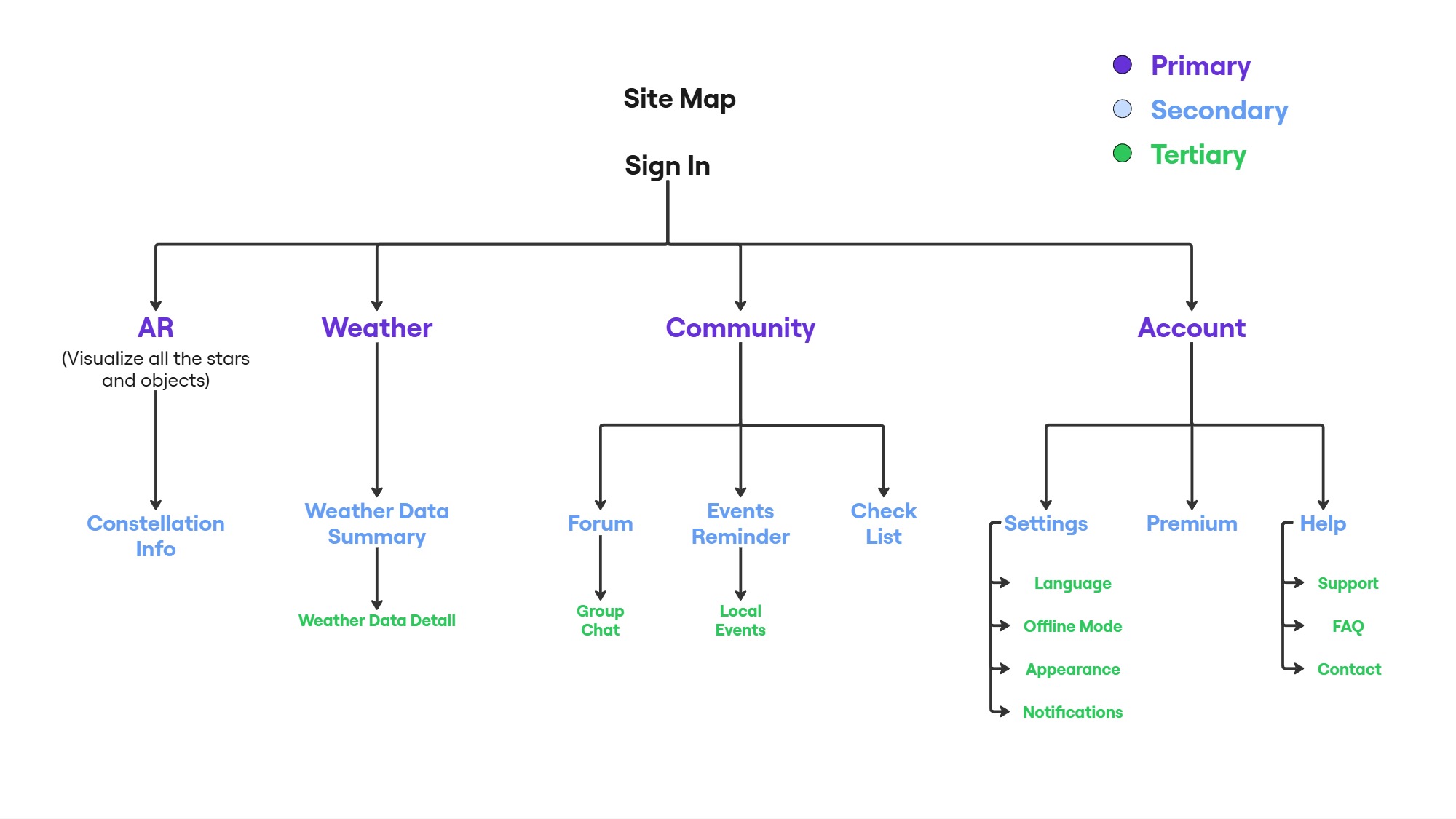
Sitemap
The platform was organized into several core experience areas based on user goals and research findings.
The structure needed to remain approachable for beginners while still supporting more advanced exploration and planning tools.
User Flows
To better understand how users would navigate the platform, I mapped out several core user flows focused on onboarding, weather exploration, and event reminders. These flows helped organize the overall experience structure, identify key interaction points, and ensure the platform remained approachable for both beginners and experienced stargazers.
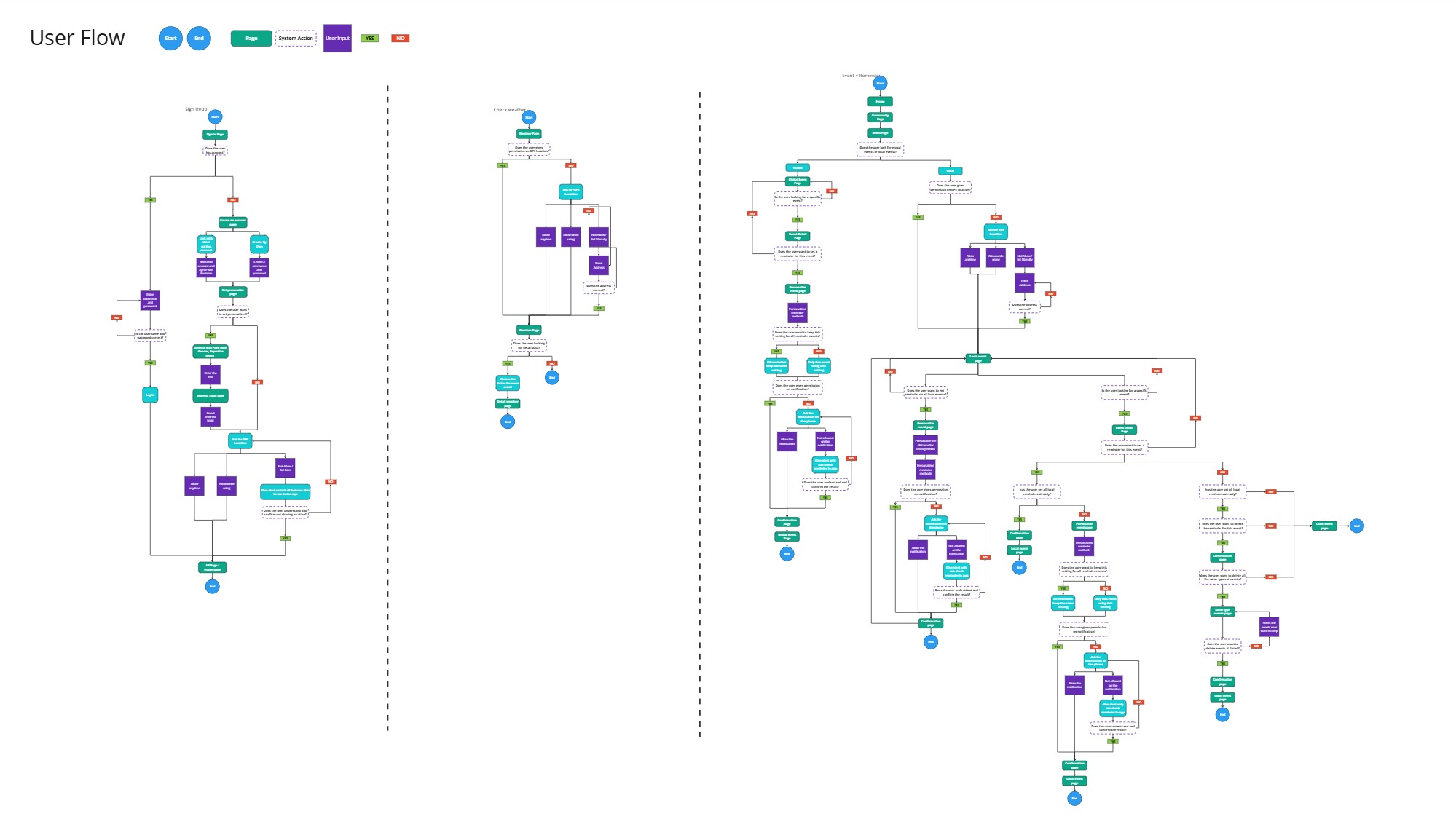
Sign Up & Personalization:
New users answer a few onboarding questions to help personalize their experience and provide the appropriate level of astronomy-related information. Users are also asked for GPS access to support more accurate location-based recommendations and sky data.
Weather Exploration:
Users can either use their current location or manually set a custom location for weather tracking. The system provides both simplified weather summaries for general users and more detailed metric pages for users who prefer deeper weather analysis and astronomy-focused data.
Events & Reminders
Sky events are divided into Global and Local categories. Users can customize reminders, notification timing, and event preferences while also managing location-based alerts and filtering specific event types based on their interests.
From Wireframes to Design Decisions
As the project evolved, I focused on translating research insights into a more immersive and approachable product experience. Rather than designing a highly technical astronomy platform, I wanted StarVista to feel intuitive, atmospheric, and emotionally engaging for users with different levels of experience.
Low-Fidelity Exploration
Early wireframes focused on organizing complex astronomy-related information while keeping the experience visually lightweight and easy to navigate.
Onboarding & Personalization
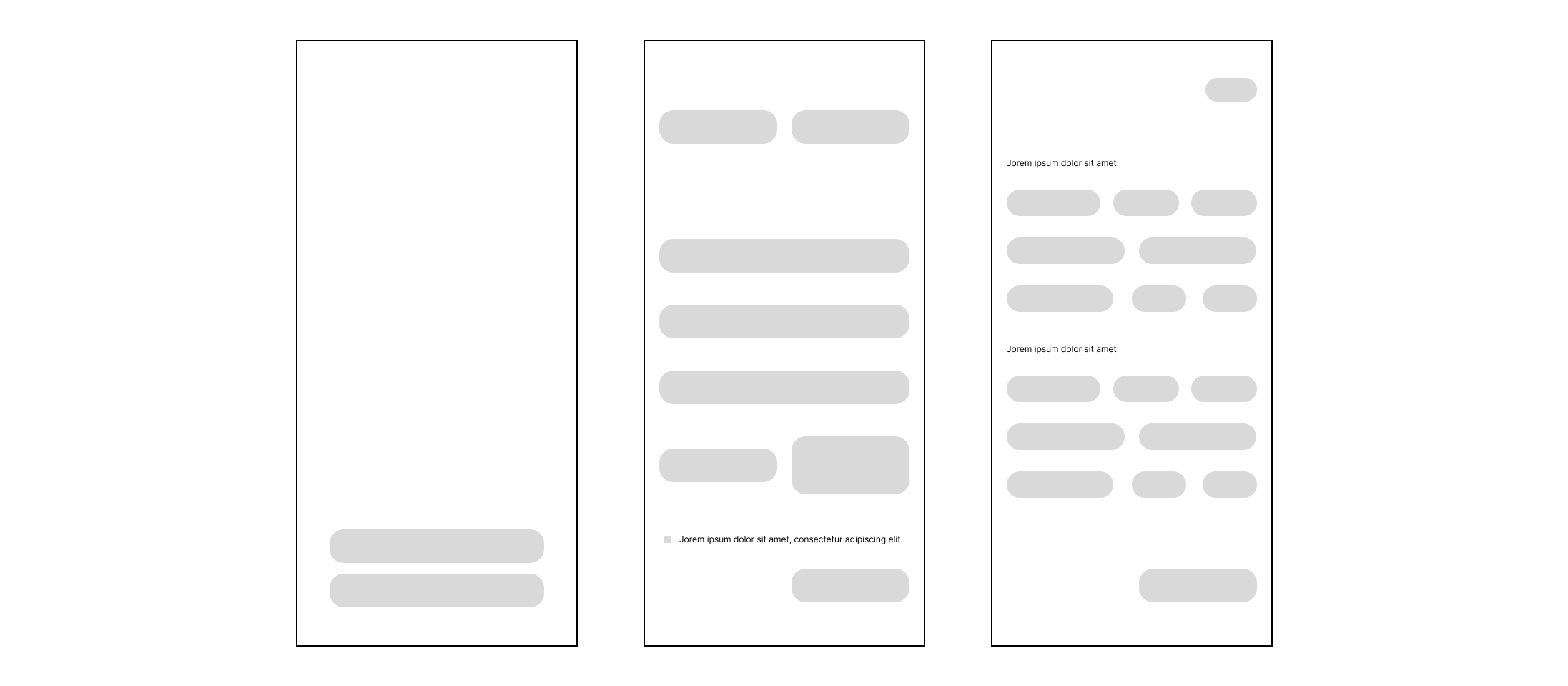
The onboarding flow was designed to create a more personalized stargazing experience from the beginning. Since users have different interests and experience levels, the app allows them to customize their preferences after signing in.
This helps surface more relevant content across weather insights, AR exploration, educational content, and community features while making the experience feel more approachable for beginners.
Weather & Forecast
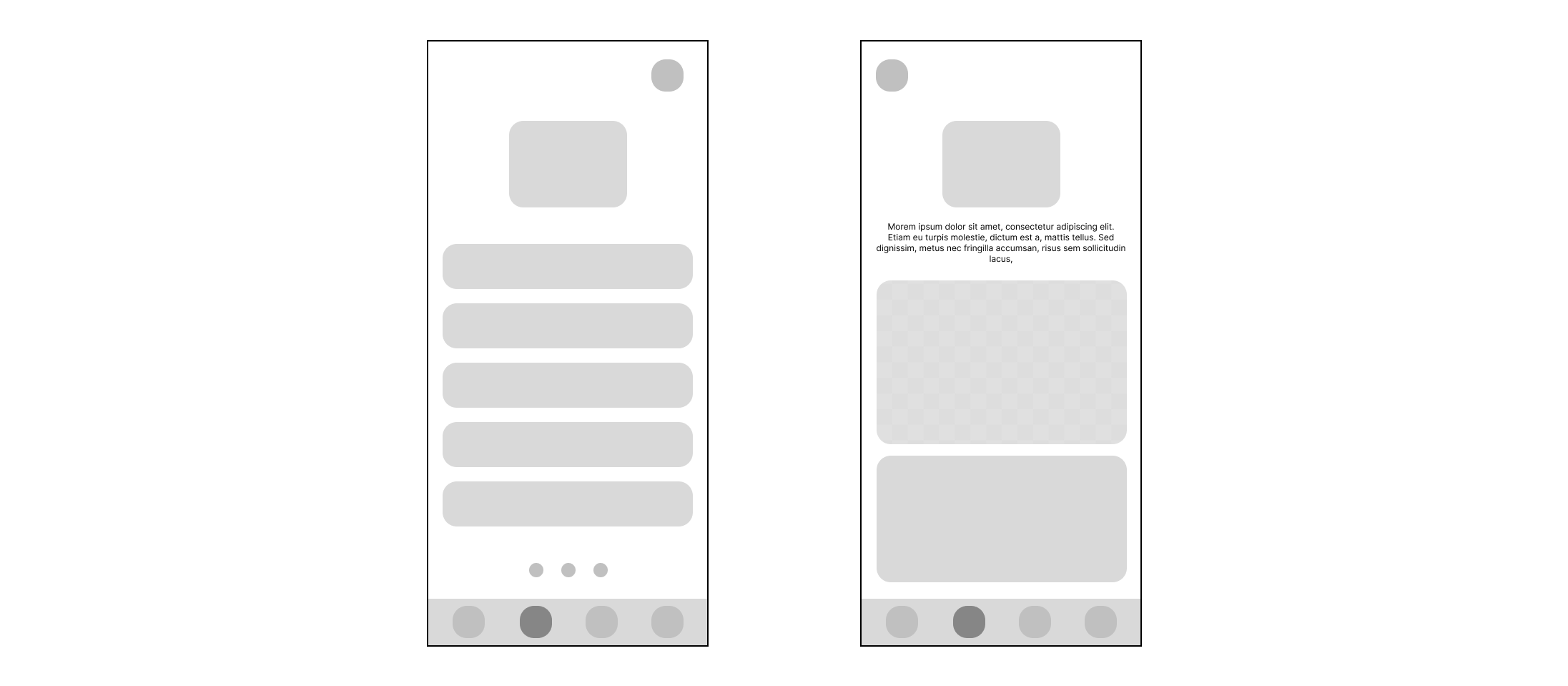
The weather section was designed to help users quickly understand whether conditions are suitable for stargazing. Since visibility and cloud coverage play a major role in the viewing experience, the interface prioritizes essential weather information in a simple and easy-to-scan layout.
The detailed weather page provides deeper environmental insights such as visibility levels and cloud conditions, helping users better plan their viewing sessions before heading outdoors.
Community & Events
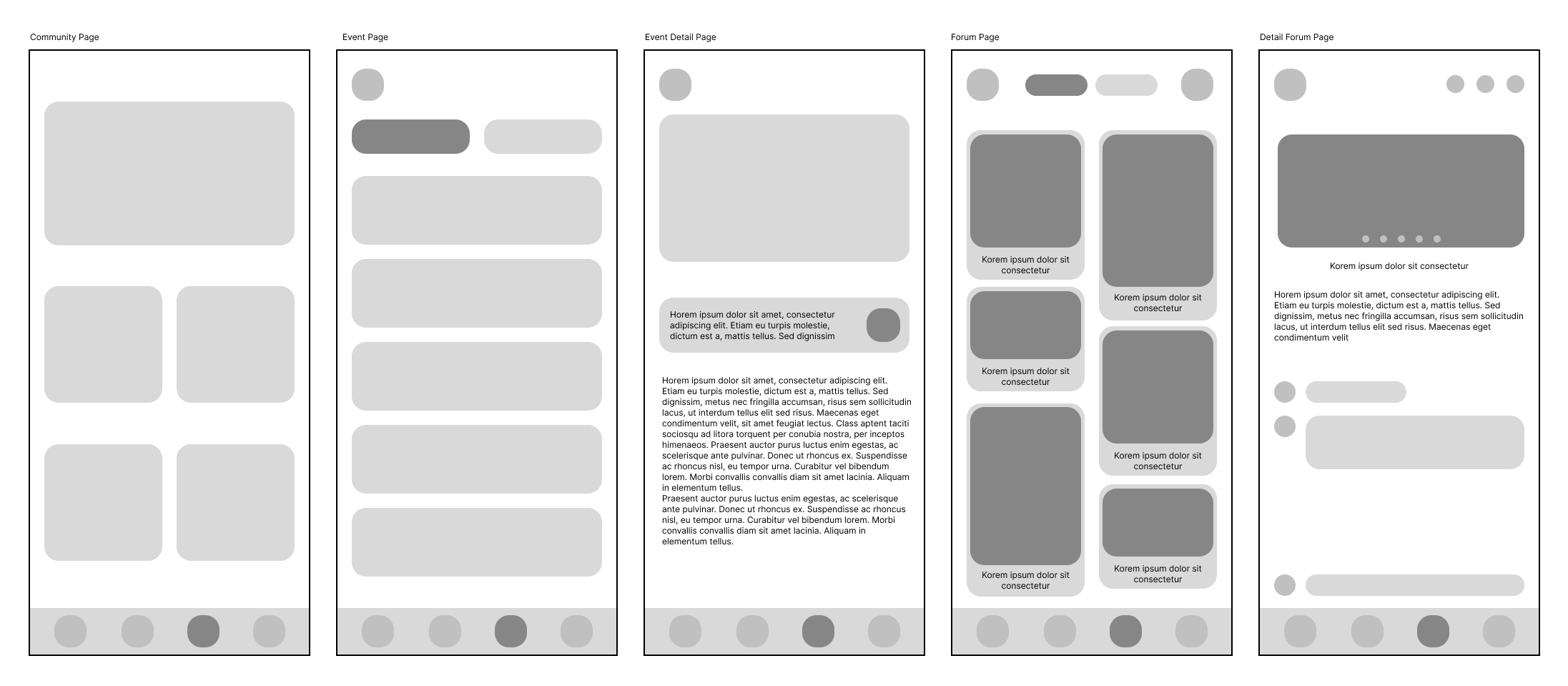
The community section was designed to make stargazing feel more social and interactive. Since many users discover viewing locations, celestial events, and astronomy discussions through online communities, the app includes forums, event pages, and group interactions within the same experience.
This allows users to share experiences, join local events, participate in discussions, and stay updated on upcoming astronomical activities without relying on multiple external platforms.
Visual System & Atmosphere
The visual direction of StarVista was inspired by the emotional experience of real-world stargazing — quiet, immersive, and atmospheric. Rather than creating a highly technical astronomy interface, I wanted the product to feel cinematic, calming, and approachable for users with different levels of experience.
The overall visual system combines dark interfaces, soft gradients, glowing highlights, and minimal distractions to recreate the feeling of observing the night sky.
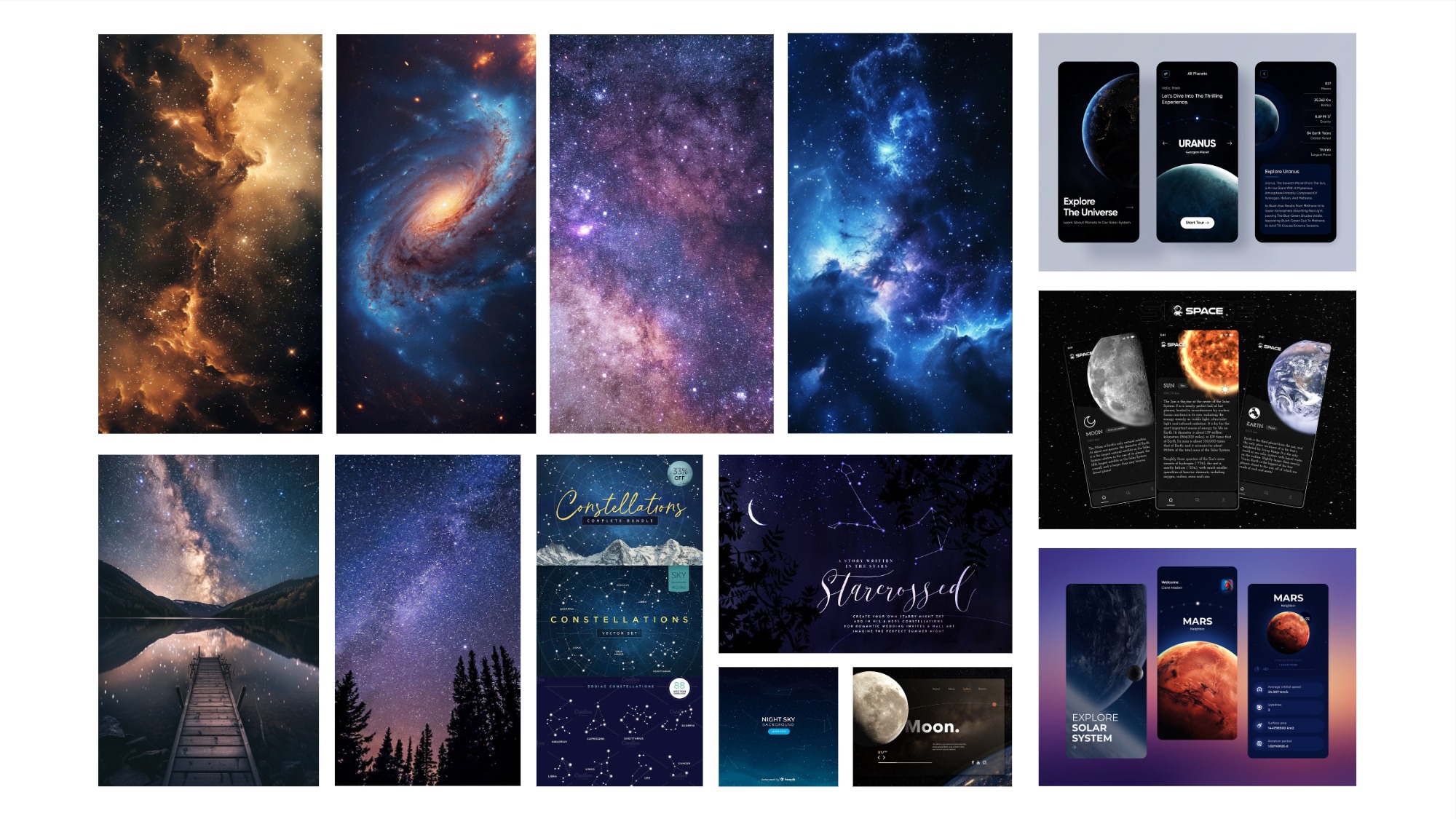
Moodboard
The moodboard explored the emotional and cinematic direction of the product through astronomy photography, immersive night landscapes, glowing space visuals, and futuristic interface inspirations.
Rather than creating a highly technical astronomy platform, the goal was to design an experience that feels calming, atmospheric, and emotionally engaging — similar to the feeling of observing the night sky in real life.
Color Palette
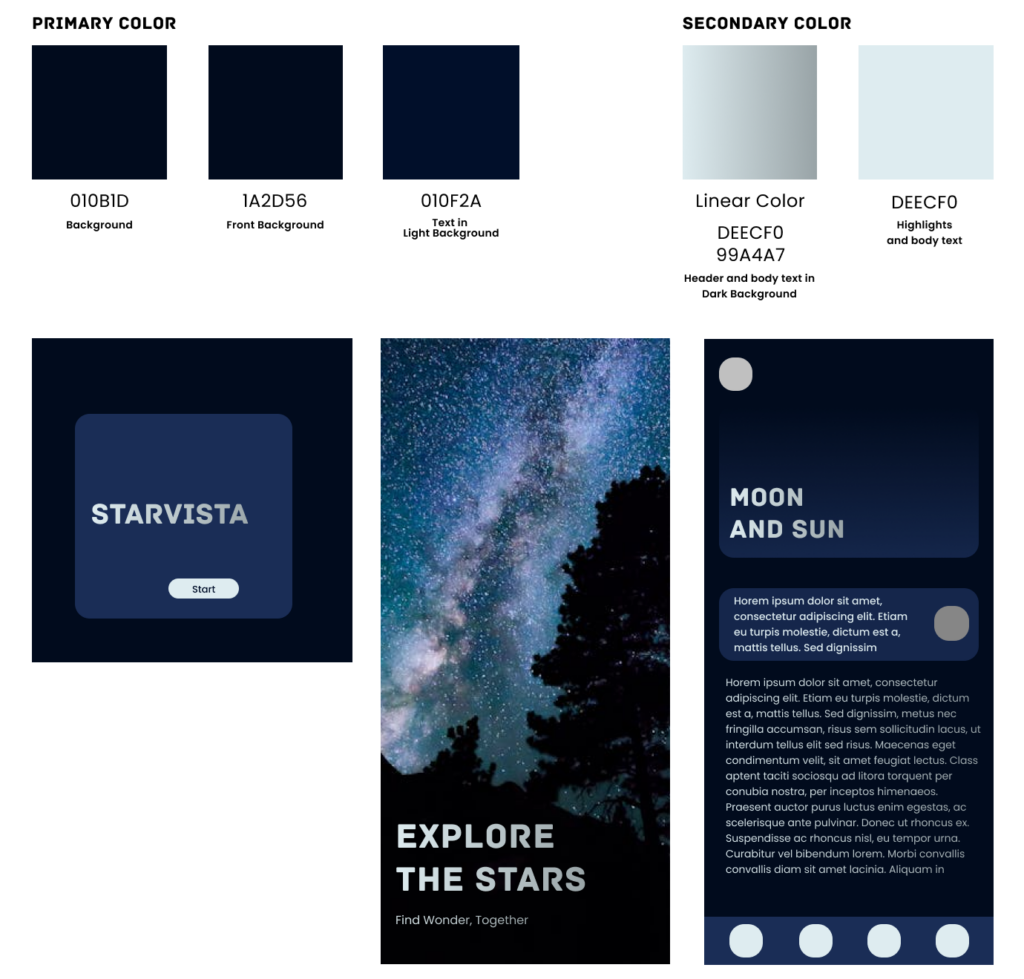
The color palette of StarVista was inspired by the layered atmosphere of the real night sky. Instead of using a single dark background color, I combined multiple deep navy tones to create subtle depth and contrast throughout the interface. This helped the experience feel more immersive and natural, similar to how the night sky is made up of multiple shades rather than one flat color.
The darker visual system also supported usability during real nighttime viewing conditions. Since users would often interact with the app while observing the sky outdoors, darker backgrounds helped reduce eye strain and minimize distraction during stargazing experiences.
For typography and highlighted content, I avoided using pure white and instead introduced a softer silver-blue tone. Pure white felt too rigid against the dark interface, while the cooler silver-blue created a softer and more atmospheric feeling that resembled the glow of stars and moonlight while still maintaining readability.
A subtle silver gradient was also applied to larger typography and highlighted elements to create a more cinematic and emotionally immersive experience.
Typography
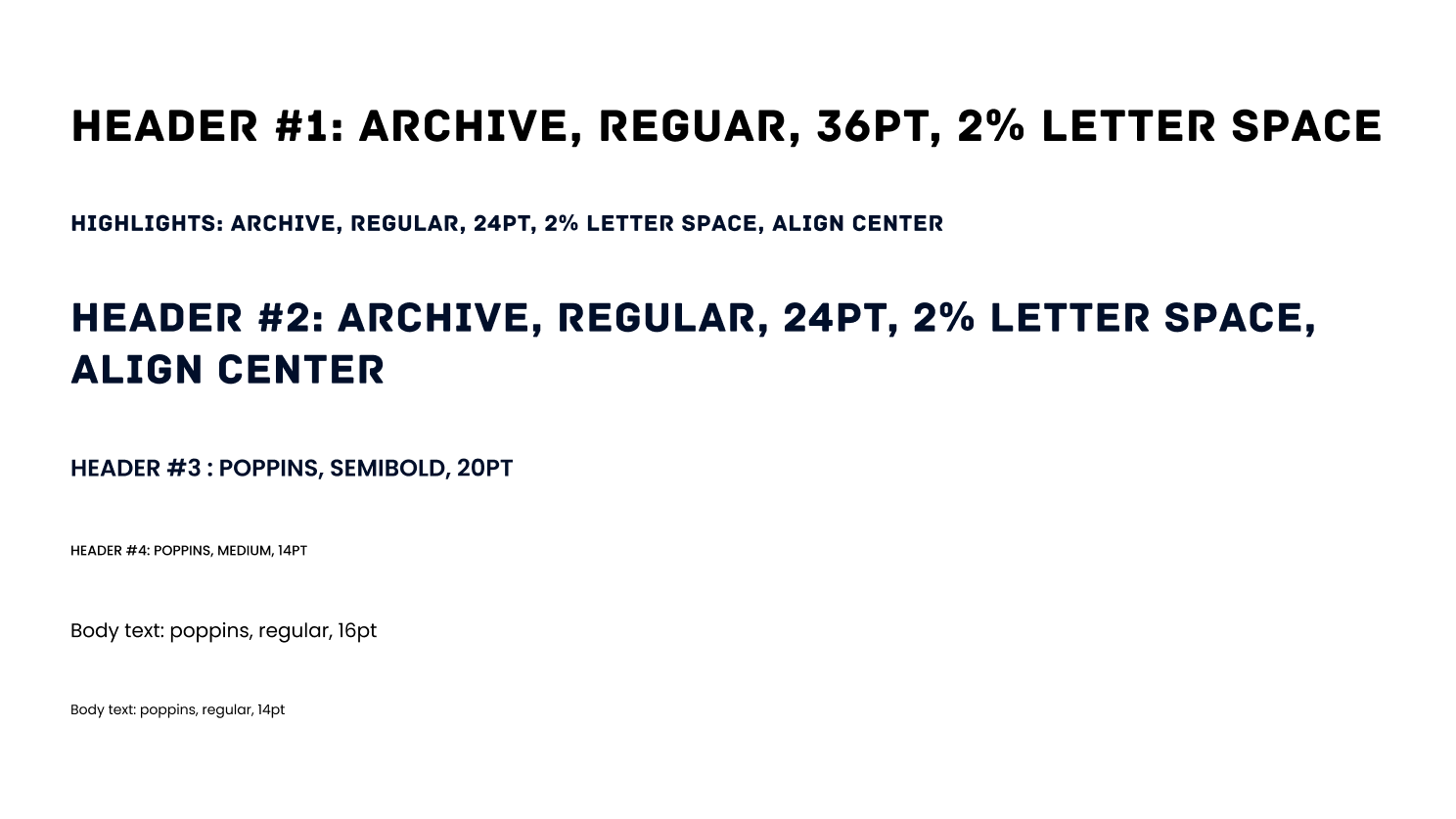
The typography system was designed to balance emotional atmosphere, readability, and product trust throughout the experience.
Archive was first selected as the primary display typeface because of its structured yet distinctive visual character. While the font remains clean and easy to recognize, subtle design details — especially within certain letterforms such as the “R” — helped introduce personality and a slightly cinematic feeling into the interface without becoming overly decorative.
This balance was important for StarVista. Although the product focuses on emotional and immersive stargazing experiences, it also relies heavily on educational content, weather information, and astronomy-related data. Using a typeface that felt too experimental or stylized could reduce the sense of reliability and trustworthiness within the product experience.
After establishing Archive as the primary heading typeface, Poppins was selected as the supporting body font to complement it. Compared to more traditional serif fonts, Poppins has a softer and more rounded structure that feels more approachable and welcoming while maintaining strong readability across longer reading sections and informational content.
Both typefaces share relatively clean and balanced geometric structures, helping create a more cohesive visual system throughout the app. Limiting the interface to only these two font families also helped maintain consistency, clarity, and a stronger sense of reliability across the overall experience.
Brand Identity
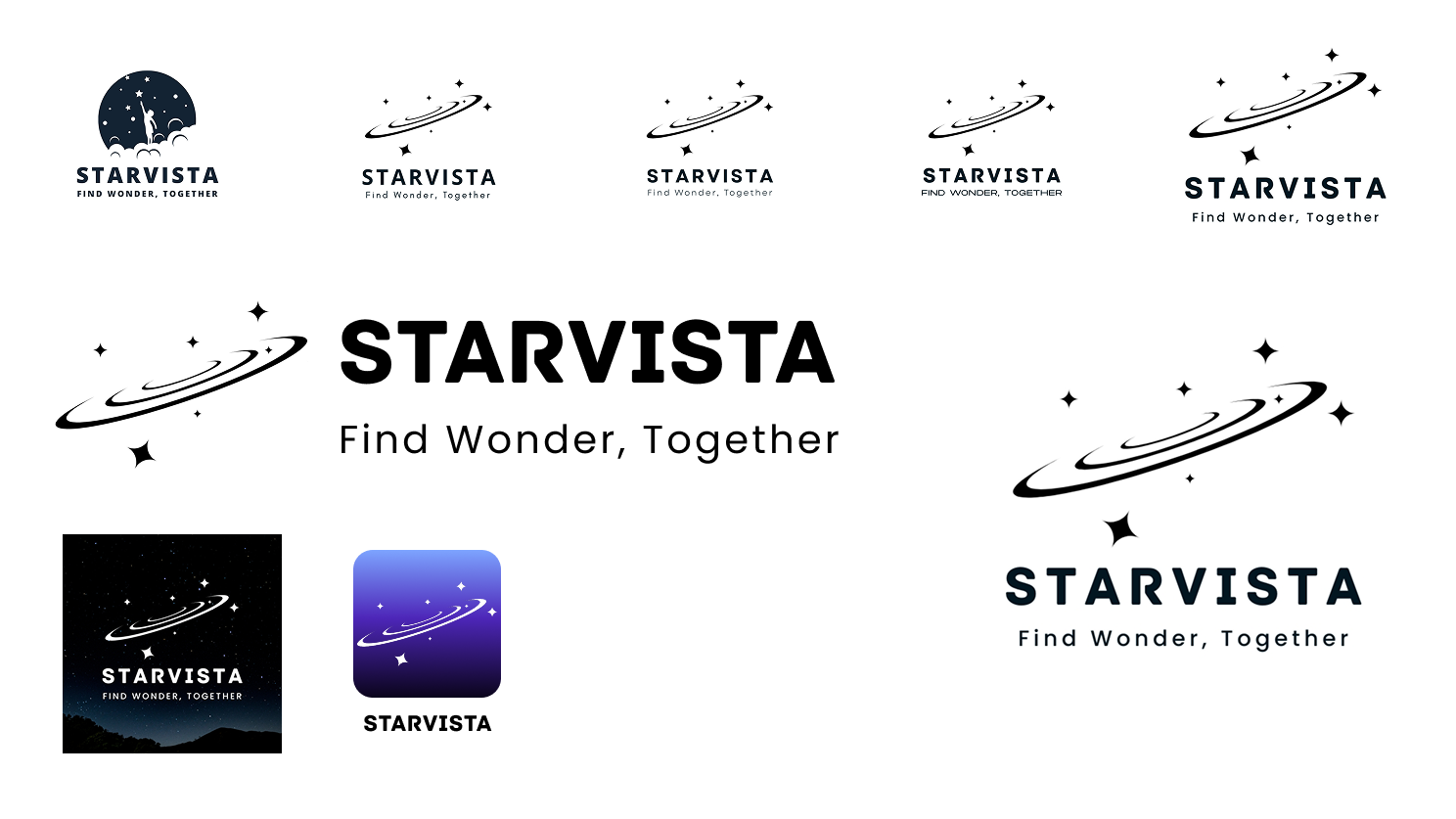
After establishing the typography and color system, I began exploring the logo direction for StarVista. My initial concept included a more detailed illustration featuring a person reaching toward the stars. While the idea felt emotional and story-driven, the overall composition became visually heavy and less aligned with the calm, minimal, and mature atmosphere I wanted the product to communicate.
As the visual system evolved, I simplified the identity and focused on a cleaner orbital star-trail symbol. The final logo felt more professional, recognizable, and visually consistent with the rest of the interface while still clearly communicating themes of astronomy, exploration, and curiosity.
The name StarVista was paired with the slogan “Find Wonder, Together” to reinforce the emotional direction of the product. While “wonder” reflects users’ curiosity and fascination with the night sky, “together” emphasizes the connection between the user, the community, and the app itself — supporting users as they explore and experience stargazing more collectively.
In addition to the primary logo, multiple logo variations and an app icon were created to support different interface contexts throughout the product experience. Maintaining a consistent visual identity across these applications helped strengthen the overall branding system while keeping the experience cohesive and recognizable.
Final Design
The final interface focused on creating a more immersive and emotionally engaging stargazing experience while maintaining clarity, accessibility, and usability across different types of users.
High-Fidelity Design
The final high-fidelity designs focused on creating a more immersive and emotionally engaging stargazing experience while maintaining clarity, usability, and accessibility across the platform. Building on the research insights, wireframes, and visual system established earlier in the process, the final interface combined cinematic visuals, simplified navigation, and atmospheric interactions to create a product experience that feels both exploratory and approachable for different types of users.
Onboarding Experience
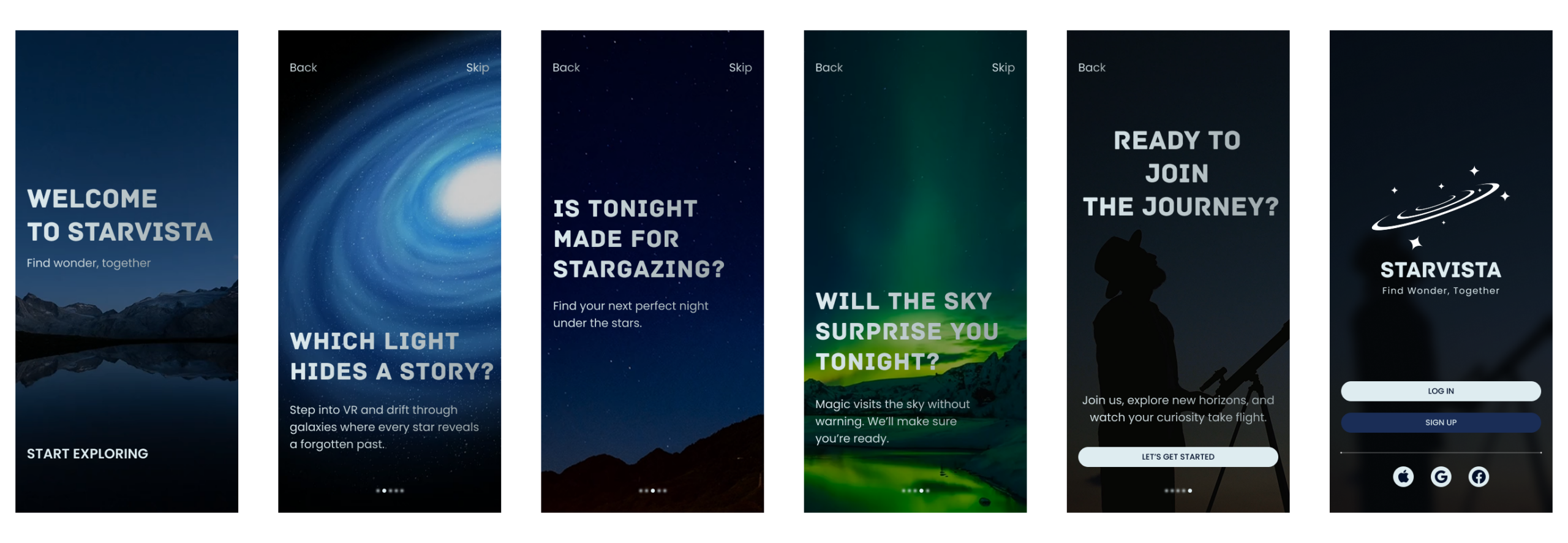
The onboarding experience evolved from the earlier personalization-focused wireframes into a more cinematic and emotionally engaging introduction to the product. Instead of immediately asking users to customize preferences, the final experience introduces the app through a series of interactive questions and atmospheric storytelling moments that subtly communicate the platform’s core features and purpose.
Each screen combines dynamic astronomy-inspired visuals — including moving star fields, galaxies, and natural sky phenomena such as the aurora — to create a stronger emotional connection between the user and the experience of stargazing. These animated backgrounds also helped make the onboarding feel more immersive, visually engaging, and alive.
The interface was designed to remain simple and accessible throughout the flow. Navigation options such as “Back” and “Skip” were placed consistently to allow users to either move through the experience at their own pace or quickly proceed to the platform.
The final login screen supports both traditional sign in/sign up methods and third-party account options including Apple, Google, and Facebook, creating a more convenient and approachable onboarding experience for different types of users.
AR Exploration & Learning
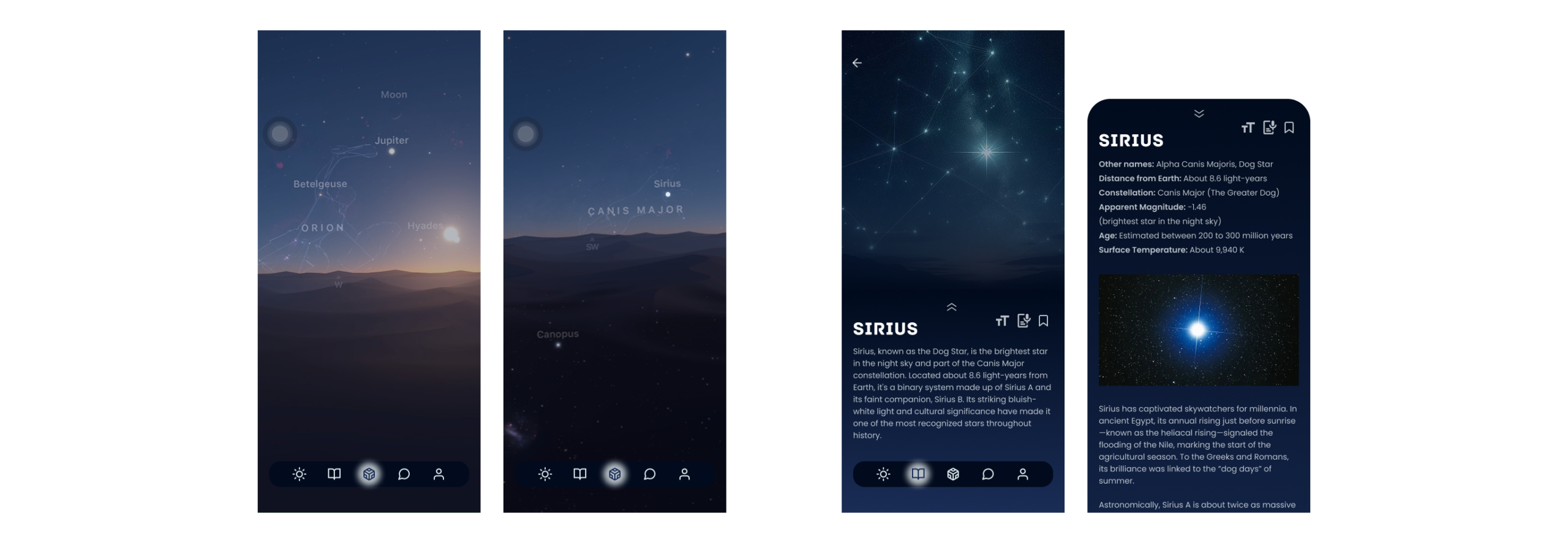
After logging into the platform, users are immediately brought into the AR experience, which became the core feature of StarVista during the design process. The AR view synchronizes with the user’s phone position and viewing angle in real time, allowing users to explore the current sky and identify major stars, constellations, and celestial objects around them.
Users can directly tap on stars or objects within the AR environment to access additional educational content. The reading experience was designed with layered information hierarchy — beginning with a shorter introduction before allowing users to expand into more detailed astronomy content if they wish to continue exploring.
To support accessibility and personalization, the reading interface also includes features such as text resizing, voice reading, and bookmarking. These tools were designed to make the experience more approachable for older users and users who may need additional reading support while also encouraging users to save and personalize content they are interested in.
Within the bottom navigation system, AR was positioned at the center of the menu to reinforce its importance within the platform. A soft glowing highlight and blurred lighting effect were also added to create stronger visual focus while subtly reflecting the atmosphere of glowing stars within the night sky.
Weather & Forecast System
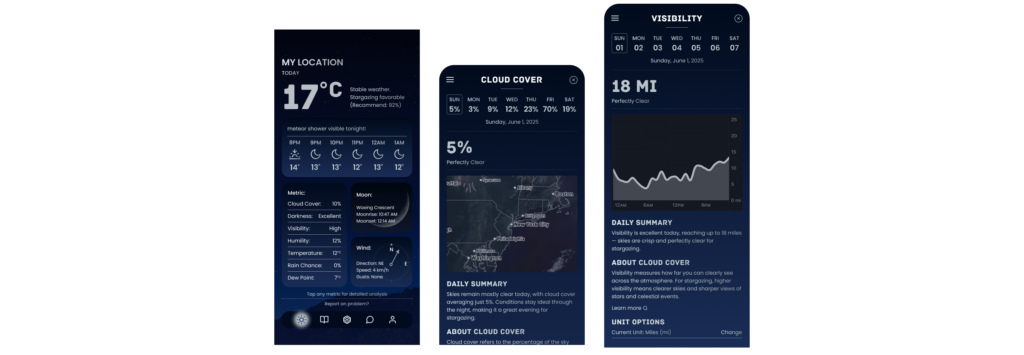
The weather experience was designed to make stargazing data easier to understand for both beginners and experienced users. Since temperature and overall weather conditions are usually the most immediate information users look for, the current temperature was placed prominently at the top of the screen alongside a short summary explaining how suitable the night is for stargazing.
To simplify the experience for newer users, the interface translates complex weather data into more direct and readable insights instead of relying only on technical metrics. Hourly forecasts are displayed directly below, while astronomy-related events such as meteor showers can also appear as reminders within the forecast section.
Additional weather metrics including cloud cover, humidity, visibility, and darkness are presented in a simplified layout for quick scanning. More visual information such as moon phases and wind direction were designed using illustrated blocks instead of text-heavy data to help users understand conditions more intuitively and efficiently.
Users can tap any metric to access a more detailed analysis page. These detail pages provide expanded visualizations such as graphs and regional weather maps, along with simplified summaries explaining what the data means in practical stargazing terms. Educational explanations and “Learn More” options were also included to support users who want to better understand astronomy and weather-related concepts.
To maintain flexibility and accessibility for different users and regions, customizable unit settings were also added throughout the weather system.
Prototype Preview
To better showcase the interaction flow and immersive experience of StarVista, an interactive prototype was developed to demonstrate navigation, transitions, and real-time user interactions across the platform.
Usability Testing & Iteration
To evaluate the clarity, usability, and overall immersion of the experience, informal usability testing was conducted on StarVista’s main features, including onboarding, AR exploration, and the weather system. The testing focused on how easily users could navigate the platform, understand astronomy-related information, and interact with the interface regardless of their experience level with stargazing.
Testing Goals
Validate a simple and approachable onboarding experience for beginners
Evaluate clarity of weather and stargazing data
Test usability of the AR exploration experience
Assess navigation flow between major platform features
Key Feedback
Positive Feedback
* Users found the visual experience immersive and atmospheric
* The onboarding flow felt clear and engaging
* AR interactions felt intuitive and visually memorable
Issues Raised
* Some users wanted clearer explanations for weather-related metrics
* Certain icons and interactions lacked enough visual guidance
* Navigation between exploration and secondary features initially felt disconnected
Iterations & Improvements
Based on the usability feedback, several revisions were made to improve clarity, accessibility, and overall navigation throughout the platform.
Onboarding :
Increased text readability and rewrote onboarding headlines into question-based prompts to create stronger curiosity and emotional engagement.
Reading Experience :
Added adjustable text sizing, bookmarking, and voice-reading features to better support accessibility and different reading preferences.
Weather System :
Added simplified summaries, expandable metric pages, and clearer visual separation between data sections to help users understand complex weather information more quickly.
Navigation & Interaction :
Reorganized navigation hierarchy and strengthened visual indicators within the bottom navigation bar to create smoother transitions between core features and improve overall orientation within the app.
Final Thoughts
What I Learned
Designing StarVista helped me better understand how emotional experience and usability can coexist within a data-driven product. Throughout the process, I explored how visual atmosphere, accessibility, and simplified information hierarchy could make astronomy feel more approachable for users with different levels of experience. I also learned the importance of balancing immersive storytelling with clarity and trust. While the product focused heavily on cinematic visuals and emotional engagement, it was equally important to maintain readability, navigation clarity, and reliable presentation of complex astronomy and weather-related information.
Future Improvements
Although the core experience of StarVista was developed, many features still have opportunities for further expansion and refinement. If continuing the project, I would further develop areas such as the community system, personalized recommendations, event organization features, and deeper AR interactions to create a more complete and fully connected platform experience. I would also continue refining accessibility, personalization, and real-time educational features to support a wider range of users and usage scenarios. The long-term goal would be to evolve StarVista from a conceptual UX/UI project into a fully launchable product experience.
UX/UI Reflection
StarVista reflects my approach to UX/UI design through the balance of emotional storytelling, accessibility, and functional clarity. Rather than treating astronomy as purely technical information, I wanted to create an experience that feels immersive, welcoming, and easier to explore for both beginners and experienced users. The project also reflects my interest in combining strong visual systems with user-centered interaction design — using hierarchy, navigation, accessibility features, and simplified information structures to transform complex content into a more intuitive and engaging experience.